> ## Documentation Index
> Fetch the complete documentation index at: https://activepieces-feat-selfhost-appwebhooks.mintlify.site/llms.txt
> Use this file to discover all available pages before exploring further.
# Create Action
This tutorial will guide you through the process of creating a Gelato piece with an action that fetches random icecream flavor and trigger that fetches new icecream flavor created. It assumes that you are familiar with the following:
* [Activepieces Repo Structure](../architecture/repo-structure)
* [Activepieces Local development](../development-setup/local) Or [Github Codespaces](../development-setup/codespaces).
* TypeScript syntax.
## Piece Definition
To get started, let's generate a new piece for Gelato
```bash
npm run cli pieces create
```
You will be asked three questions to define your new piece:
1. `Piece Name`: Specify a name for your piece. This name uniquely identifies your piece within the ActivePieces ecosystem.
2. `Package Name`: Optionally, you can enter a name for the npm package associated with your piece. If left blank, the default name will be used.
3. `Piece Type`: Choose the piece type based on your intention. It can be either "custom" if it's a tailored solution for your needs, or "community" if it's designed to be shared and used by the broader community.
**Example:**
```bash
npm run cli pieces create
? Enter the piece name: gelato
? Enter the package name: @activepieces/piece-gelato
? Select the piece type: community
```
The piece will be generated at `packages/pieces/community/gelato/`,
the `src/index.ts` file should contain the following code
```ts
import { PieceAuth, createPiece } from '@activepieces/pieces-framework';
export const gelato = createPiece({
displayName: 'Gelato',
logoUrl: 'https://cdn.activepieces.com/pieces/gelato.png',
auth: PieceAuth.None(),
authors: [],
actions: [],
triggers: [],
});
```
### Piece Authentication
Now, let's establish authentication for this piece, which necessitates the inclusion of an API Key in the headers.
Modify `src/index.ts` file to add authentication,
```ts
import { PieceAuth, createPiece } from '@activepieces/pieces-framework';
export const gelatoAuth = PieceAuth.SecretText({
displayName: 'API Key',
required: true,
description: 'Please use **test-key** as value for API Key',
});
export const gelato = createPiece({
displayName: 'Gelato',
logoUrl: 'https://cdn.activepieces.com/pieces/gelato.png',
auth: gelatoAuth,
authors: [],
actions: [],
triggers: [],
});
```
Use the value **test-key** as the API key when testing actions or triggers for
Gelato.
## Action Definition
Now let's create first action which fetch random ice-cream flavor.
```bash
npm run cli actions create
```
You will be asked three questions to define your new piece:
1. `Piece Folder Name`: This is the name associated with the folder where the action resides. It helps organize and categorize actions within the piece.
2. `Action Display Name`: The name users see in the interface, conveying the action's purpose clearly.
3. `Action Description`: A brief, informative text in the UI, guiding users about the action's function and purpose.
Next, Let's create the action file:
**Example:**
```bash
npm run cli actions create
? Enter the piece folder name : gelato
? Enter the action display name : get icecream flavor
? Enter the action description : fetches random icecream flavor.
```
This will create a new TypeScript file named `get-icecream-flavor.ts` in the `packages/pieces/community/gelato/src/lib/actions` directory.
Inside this file, paste the following code:
```typescript
import {
createAction,
Property,
PieceAuth,
} from '@activepieces/pieces-framework';
import { httpClient, HttpMethod } from '@activepieces/pieces-common';
import { gelatoAuth } from '../..';
export const getIcecreamFlavor = createAction({
name: 'get_icecream_flavor', // Must be a unique across the piece, this shouldn't be changed.
auth: gelatoAuth,
displayName: 'Get Icecream Flavor',
description: 'Fetches random icecream flavor',
props: {},
async run(context) {
const res = await httpClient.sendRequest({
method: HttpMethod.GET,
url: 'https://cloud.activepieces.com/api/v1/webhooks/RGjv57ex3RAHOgs0YK6Ja/sync',
headers: {
Authorization: context.auth, // Pass API key in headers
},
});
return res.body;
},
});
```
The createAction function takes an object with several properties, including the `name`, `displayName`, `description`, `props`, and `run` function of the action.
The `name` property is a unique identifier for the action. The `displayName` and `description` properties are used to provide a human-readable name and description for the action.
The `props` property is an object that defines the properties that the action requires from the user. In this case, the action doesn't require any properties.
The `run` function is the function that is called when the action is executed. It takes a single argument, context, which contains the values of the action's properties.
The `run` function utilizes the httpClient.sendRequest function to make a GET request, fetching a random ice cream flavor. It incorporates API key authentication in the request headers. Finally, it returns the response body.
## Expose The Definition
To make the action readable by Activepieces, add it to the array of actions in the piece definition.
```typescript
import { createPiece } from '@activepieces/pieces-framework';
// Don't forget to add the following import.
import { getIcecreamFlavor } from './lib/actions/get-icecream-flavor';
export const gelato = createPiece({
displayName: 'Gelato',
logoUrl: 'https://cdn.activepieces.com/pieces/gelato.png',
authors: [],
auth: gelatoAuth,
// Add the action here.
actions: [getIcecreamFlavor], // <--------
triggers: [],
});
```
# Testing
By default, the development setup only builds specific components. Open the file `packages/backend/.env` and include "gelato" in the `AP_DEV_PIECES`.
For more details, check out the [Piece Development](../development-setup/getting-started) section.
Once you edit the environment variable, restart the backend. The piece will be rebuilt. After this process, you'll need to **refresh** the frontend to see the changes.
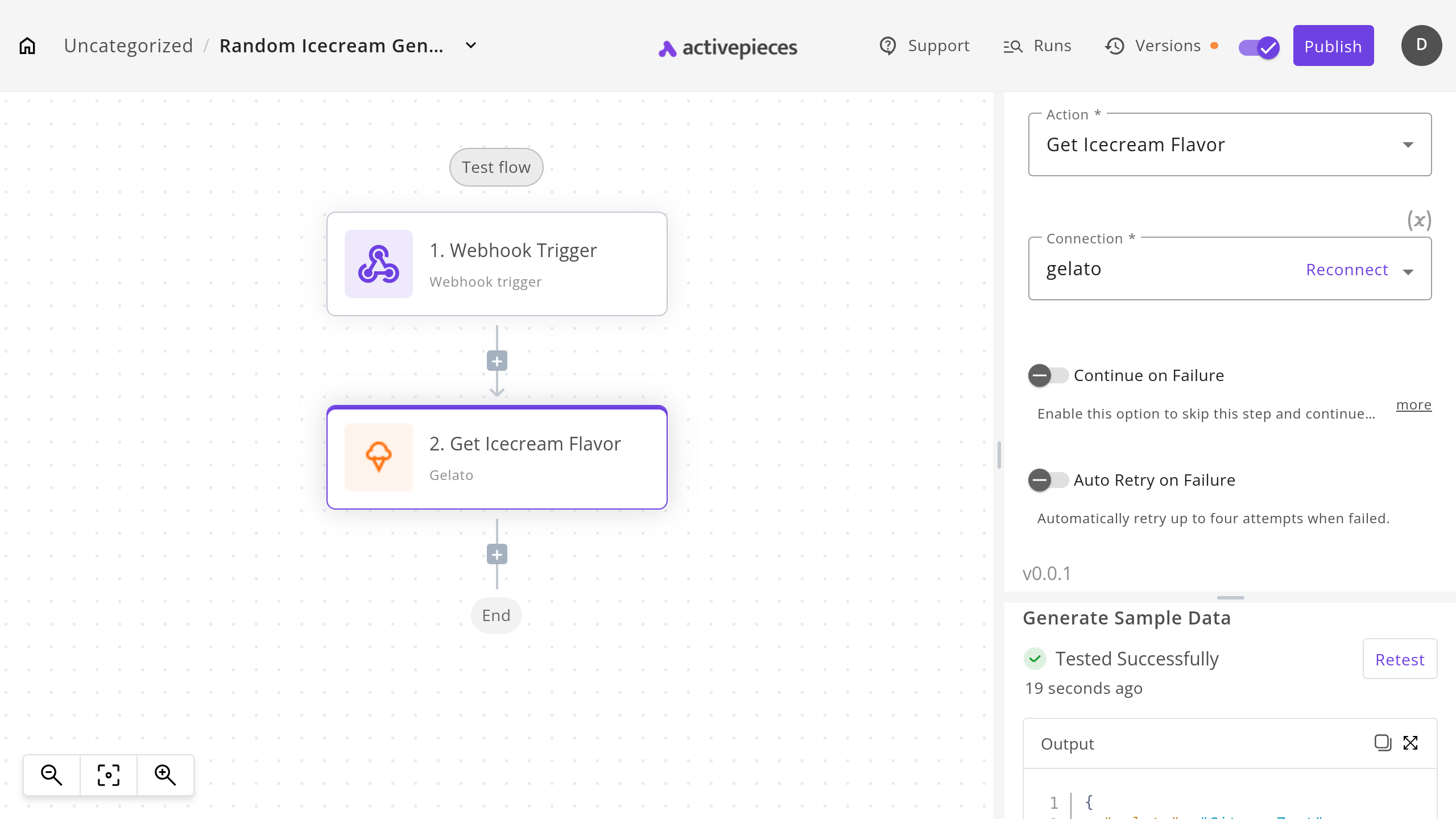
To test the action, use the flow builder in Activepieces. It should function as shown in the screenshot.